
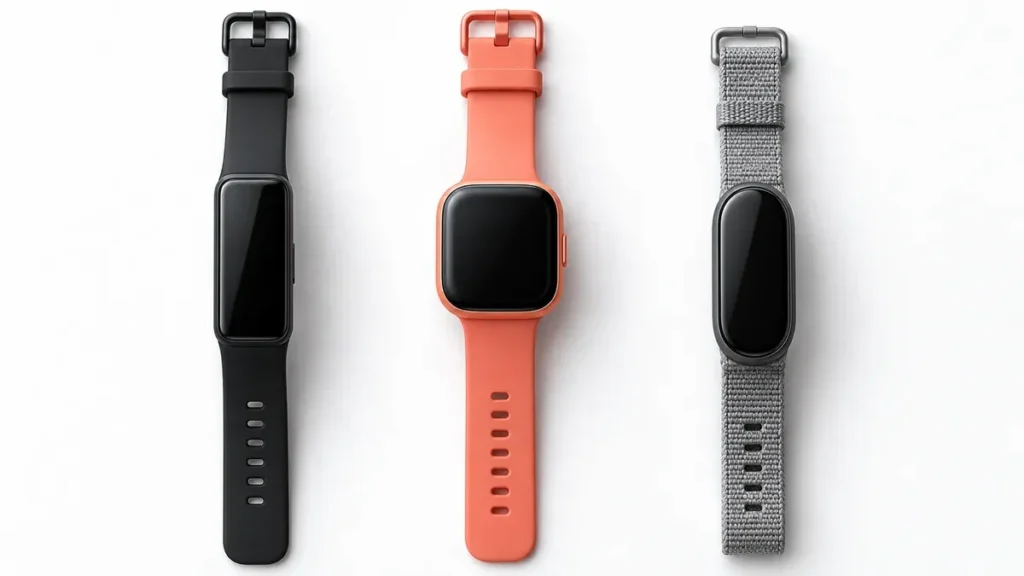
Short answer: Fitbit bands are interchangeable — but only within the same model family, not across every Fitbit. A band made for a Charge won’t fit a Versa, and a band for an older Inspire won’t fit a newer one. Buying a band without checking your exact model is the number one reason a “replacement band” ends up back in the box. This guide lays out precisely which Fitbit bands swap with which, so you order the right one the first time.
The short answer
Every modern Fitbit uses a quick-release band system, so swapping a band is quick and tool-free. But Fitbit never standardized band sizes across its whole lineup the way Apple did for the Apple Watch. Each family of devices — Charge, Versa/Sense, Inspire, Luxe, Fitbit Air, Ace — has its own connector shape and width. So a band is interchangeable with other devices in its family, and not with devices outside it. The trick is simply knowing which models belong to the same family.
Fitbit band compatibility by model
Here’s what shares bands with what:
Charge series: The Charge 5 and Charge 6 use the same bands and are fully interchangeable. The older Charge 3 and Charge 4 share a different band with each other — but Charge 3/4 bands do not fit the Charge 5/6, and vice versa.
Versa & Sense series: The original Versa, Versa 2, Versa Lite share one band style — and the Luxe uses that same style too. The newer Versa 3, Versa 4, Sense, and Sense 2 share a different band. Don’t assume a Versa 2 band fits a Versa 4; they’re in different groups.
Inspire series: The Inspire and Inspire HR are interchangeable with each other. The Inspire 2 and Inspire 3 use their own bands — not compatible with the first Inspire.
Luxe: Takes the same bands as the Versa, Versa 2, and Versa Lite.
Fitbit Air: The newer Fitbit Air uses its own dedicated band system, so it needs bands made specifically for it — nothing from the older families fits.
Ace (kids’ trackers): The Ace line doesn’t use the standard quick-release design at all — the tracker pops into a holder in the middle of the band — so Ace bands aren’t interchangeable with any of the adult models.
Why aren’t all Fitbit bands the same?
It comes down to design. Fitbit’s trackers and smartwatches have very different case shapes and sizes — a slim Inspire, a squarish Versa, a compact Charge — and each was built with a connector sized for that body. Unlike the Apple Watch, where bands are grouped by a handful of case widths, Fitbit’s families each got their own fitting. It means more care when you shop, but it also means there’s a huge, affordable aftermarket for each popular model.
How to find out which band your Fitbit takes
If you’re unsure which Fitbit you own, check the back of the tracker (the model name is often printed there) or open the Fitbit app, where your device is listed under your account. Once you know the exact model, shop for a band that names that model — “fits Fitbit” or even “fits Fitbit Charge” without a number isn’t specific enough.
What about third-party bands?
Third-party bands follow exactly the same rule: they’re interchangeable within a model family, not across all Fitbits. The good news is that for any popular model you’ll find dozens of affordable options in every material. Just buy one that clearly lists your exact model, fits the quick-release connector properly, and is sold honestly as compatible (not a counterfeit “official” Fitbit product). A cheap band with a loose connector can let your tracker fall off, so quality at the attachment point matters more than looks.
How to swap a Fitbit band
It takes about ten seconds and needs no tools. Turn the tracker over, find the small quick-release latch where the band meets the device, press it in with a fingernail, and gently pull the band away at a slight angle. Repeat on the other side. To attach the new band, hold one end at about a 45-degree angle, slot the pin into the groove, and push until you hear a light click — then do the same on the other side and give it a tug to confirm it’s locked. (A few models use a pin-and-peg design: insert the bottom half first, then slide the top until it clicks.)
Quick reference
Interchangeable groups: Charge 5 + Charge 6 · Charge 3 + Charge 4 · Versa + Versa 2 + Versa Lite + Luxe · Versa 3 + Versa 4 + Sense + Sense 2 · Inspire + Inspire HR · Inspire 2 + Inspire 3. Stand-alone: Fitbit Air (own system) and Ace (holder-style, not interchangeable).
Find the right band
Once you know your model, picking a style is the easy part. For help choosing by material and use case, see our guide to the best Fitbit watch bands, and if you have the newest tracker, our roundup of the best Fitbit Air replacement bands. You can also browse everything in our Fitbit bands collection.
Frequently asked questions
Can I use a Charge 5 band on a Charge 6? Yes. The Charge 5 and Charge 6 use identical bands, so any band for one fits the other.
Will a Versa band fit a Sense? It depends on the generation. The Sense and Sense 2 share bands with the Versa 3 and Versa 4, but not with the original Versa or Versa 2.
Do Fitbit Air bands fit other Fitbits? No. The Fitbit Air uses its own dedicated band system that isn’t compatible with any other Fitbit model.
Are third-party Fitbit bands interchangeable the same way? Yes — they follow the same by-family rule. Buy one that lists your exact model and fits the connector properly.
Why don’t all Fitbit bands fit every Fitbit? Because each Fitbit family has a differently shaped and sized case and connector. Fitbit never standardized band sizes across the whole lineup, so you match the band to your model’s family.

Comments